Showing posts with label opera. Show all posts

Opera: Using Firefox style keyboard shortcuts in Opera

Getting sick of Firefox and their stupid rolling releases. Even more so with the speed and memory usage. Switching between browsers hasn't really been a problem for me when it comes to vanilla installs, except for Opera.
What the heck is that Ctrl+K shortcut? Most browsers seem to focus to the search or address controls when it's pressed. Opera on the other hand goes to some weird profiles thing.
To make it more like Firefox:
  • Just open up your Opera browser and click/paste this link.
  • When a dialog shows up asking if you want to use the keyboard layout, click "Yes".
image
  • That's it! New settings already applied.
If you want to go all out and make it look and feel like Firefox, see the source link below.

*update 23/08/2012* Updated the download link for the settings file.

Source

Opera Browser: Change next tab keyboard shortcut

I like to use the keyboard where possible. In Firefox, I set my Ctrl+Page Up/Down buttons to switch between tabs so I don't have to reach for my mouse as much.

However, when I tried to do this on Opera... god damn wut!? This is one of the cases where it's harder than it should have been.

Firstly, find the settings dialog by:

  • Going to Opera > Settings > Preferences (Ctrl + F12)
  • Advanced > Shortcuts
  • if you haven't already, under "Keyboard setup" make a duplicate of "Opera Standard". I named mine "Opera Standard (modified)".
  • Select the new scheme then press "Edit".

image

Try not to gasp when you see this hideous dialog.

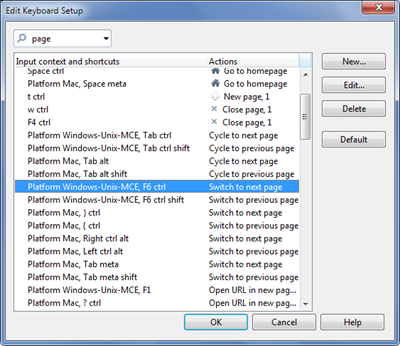
Type in "page" to start filtering the options.
image

  • Under "Application", search for "Switch to next page".
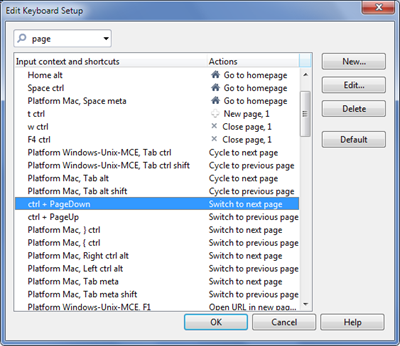
  • In the left column, double click it and paste in "ctrl + PageDown" (it's case sensitive!)
  • As for "Switch to previous page", paste in "ctrl + PageUp".

It should now look like this:
image

Alright! Confirm to exit and it should apply straight away.

I really hope Opera takes the time to polish these features as Firefox has become buggy and downright stupid after adopting the rapid release schedule.

Opera: Disable context menu on double click

I like Opera. It's fast, slick and clean but some of it's default behaviour really puts me off making it my default browser.
One of which is the double clicking of text brings up the context menu. The way I like to read is to highlight as I go, and often I do so by double or triple clicking text.
To stop this from happening:
  • Click on the Opera button
  • Go to "Settings"
  • Select "Preferences"
image
  • Click on "Advanced"
  • "Toolbars"
  • Untick "Double-click to display context menu"
  • OK to save and exit
Voila! No more stupid context menu unless you right click.
[ Source ]

jQuery: Window height given wrong value in Opera

After some messing around with jQuery, Opera and CSS, I figured it wasn't my fault the element wasn't being centered in the middle of the screen.

The reason being that as of Opera 9.5, they relocated the body height of the document to another place, so jQuery retrieves the wrong size when you call $(window).height().

A simple one line fix would to retrieve the correct height would be:

// fix a jQuery/Opera bug with determining the window height
var h = $.browser.opera && $.browser.version > "9.5" &&
$.fn.jquery <= "1.2.6" ?
document.documentElement["clientHeight"] :
$(window).height();

[ Source ]

 
Copyright © Twig's Tech Tips
Theme by BloggerThemes & TopWPThemes Sponsored by iBlogtoBlog